Tracking the movement of filled and empty cylinders can be a complex task — especially for gas agencies, industrial suppliers, and manufacturers. The Empty Cylinder Tracking Addon for Busy Accounting Software solves this challenge with a structured and automated process.
This addon helps you manage both issued filled cylinders and returned empty cylinders with precision, ensuring you always know your cylinder inventory and return status party-wise. Here’s how it works:
🔧 Step-by-Step Guide to Using the Empty Cylinder Tracking Addon
✅ Step 1: Create Cylinder Items in Master
Start by creating the necessary items in your item master list.
Examples:
- Filled 45kgs CO₂ Cylinder
- Empty 45kgs CO₂ Cylinder
👉 Make sure each cylinder has a corresponding filled and empty item for accurate tracking.
⚙️ Step 2: Configure Cylinder Mapping
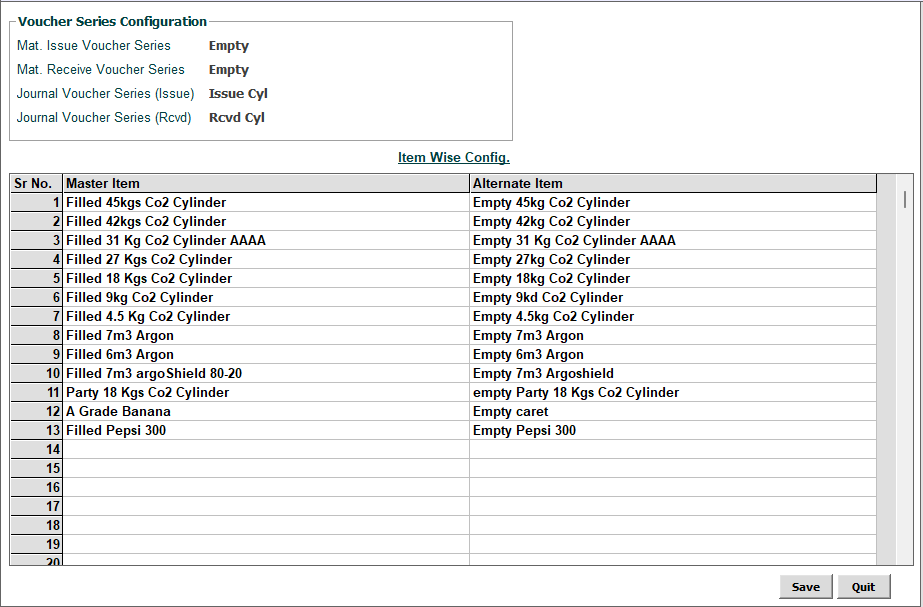
Once your items are ready, open the Cylinder Configuration Addon. In this section:
- Select the Material Issue and Material Receive voucher series.
- You’ll see two mapping columns:
- Master Item (e.g., Filled 45kgs CO₂ Cylinder)
- Alternate Item (e.g., Empty 45kgs CO₂ Cylinder)
- Map each filled item to its corresponding empty item.
- Click Save to finish configuration.
📌 This is a one-time setup, but you can update it anytime with new items.
🧾 Step 3: Create a Sale Voucher
When billing customers for filled cylinders:
- Select the Filled Cylinder Item in the sale voucher.
- A popup will appear asking for the quantity of empty cylinders returned.
- You can enter the returned quantity or leave it blank if no return is made.
- Enter the sale quantity and price, then save the voucher.
Once saved:
- A Material Issue Voucher is automatically created for the filled cylinders.
- If return quantity is entered, a Material Receive Voucher is also generated for the returned empty cylinders.
✅ This automation ensures real-time inventory updates with no manual tracking.
📊 Step 4: Cylinder Reporting and Tracking
To view detailed cylinder movement:
- Navigate to Display > Job Work Report > Outside Job Work.
- Use the Job Summary (Party-Wise) and other reports to view:
- Qty Issued: Number of cylinders sent to each party
- Qty Adjusted: Returned cylinders
- Closing Balance: Pending returns (cylinders not yet returned)
These reports help you track and reconcile inventory, prevent cylinder losses, and manage client accountability.
🔁 Step 5: Only Return Scenario – Material Receive Voucher
Sometimes, you might receive empty cylinders back without a new sale. In such cases:
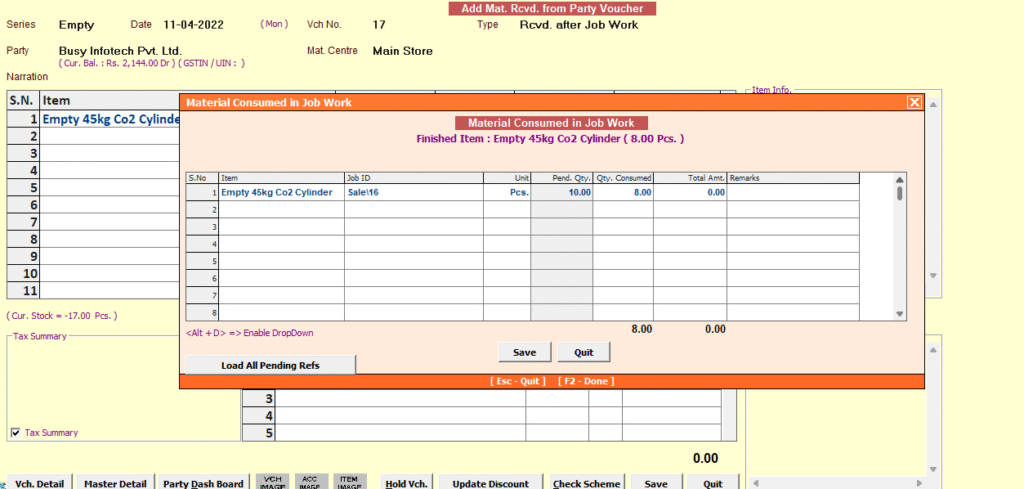
- Create a Material Receive Voucher.
- Select the Empty Cylinder Item.
- A “Material Consumed” popup will appear.
- Click Load All Pending References to fetch linked issued items.
- Enter the return quantity and save.
✅ This process ensures that all returns are accurately matched with past issues, maintaining a clean and reliable stock ledger.
🎯 Key Benefits of the Empty Cylinder Tracking Addon
- Auto-Linked Vouchers: Material Issue & Receive Vouchers are created without manual effort.
- Accurate Party-Wise Tracking: Know exactly how many cylinders each customer has and what’s pending.
- Inventory Control: No more cylinder mismatches or losses.
- Easy Reconciliation: Transparent return and issue status.
- Real-Time Reports: Quickly check balances and plan purchases or collections.
🛠️ Who Should Use This Addon?
This addon is ideal for:
- LPG & CO₂ gas dealers
- Oxygen & nitrogen cylinder suppliers
- Fire extinguisher service companies
- Welding and industrial gas providers
If your business involves cylinder delivery and returns, this tool will save time, reduce manual errors, and give you total control over your cylinder inventory.
📞 Get Started Today
Ready to transform your customer experience and simplify cylinder inventory tracking?
💬 Contact Us for a Demo or Installation
📧 Email us at: contact@busyplugin.com
📞 Helpline: +91 70828 24212
🌐 Website: www.busyplugin.com
Let your customers earn more than just invoices — give them a reason to return, every time.
🔘 Download Setup
Please click the button below to download the setup file for installation.
Disclaimer: Accounting Software are registered trademarks of their respective owners. This addon is a third-party customization developed to enhance Busy’s capabilities.