
Managing a hospital, nursing home, or clinic involves handling a wide range of activities — from patient registrations, billing, prescription management, and investigations, to follow-ups and discharge summaries. To simplify and automate these operations, the Hospital Addon for Busy Accounting Software has been developed. This powerful and integrated solution enables healthcare providers to digitally manage OPD/IPD records, fee collection, follow-ups, advance payments, and more — all within their existing Busy environment.
Whether you’re a private practitioner, multi-specialty clinic, or diagnostic center, this addon eliminates manual paperwork, reduces operational errors, and improves patient experience through a centralized, digital workflow.
Hospital Addon Window
🔧 Initial Setup – Configuration Before Use
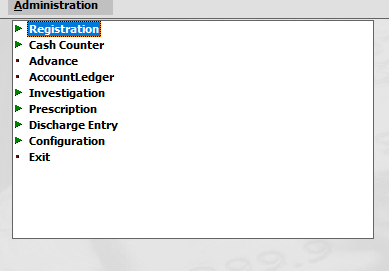
Before using the Hospital Addon, proper configuration is necessary. Upon launching the addon via Addons → Hospital Addon, a user-friendly interface opens with structured menu options.
Configuration Module
Here are the three critical setup areas:
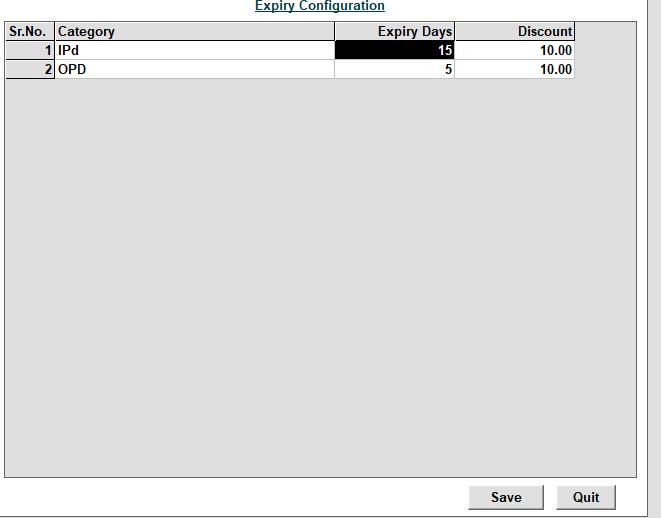
1. Expiry Configuration
You can define validity periods for both OPD and IPD patients. For example:
- OPD Card validity: 5 days
- IPD Card validity: 15 days
This helps track patient eligibility for follow-ups and service benefits like discounts.
Additionally, you can apply automatic discounts based on category and expiry settings.
2. User Restriction Settings
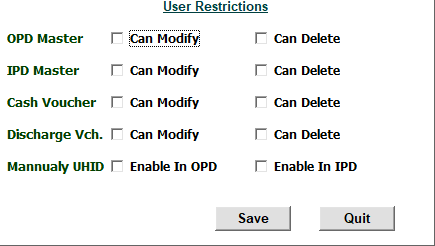
Define access and permission controls for different system users. You can allow or restrict:
- Modification or Deletion of:
- OPD Records
- IPD Records
- Cash Vouchers
- Discharge Entries
- Enable/Disable manual UHID creation in both OPD and IPD modules
🧾 Module 1: Patient Registration (OPD & IPD)
This is the core module to record patient details and generate a registration slip.
OPD Registration
Clicking on Registration → OPD shows three options:
- Add – To register a new/existing patient
- Modify – To edit existing entries
- List – To view all registered OPD patients
Add OPD Registration – Step-by-Step:
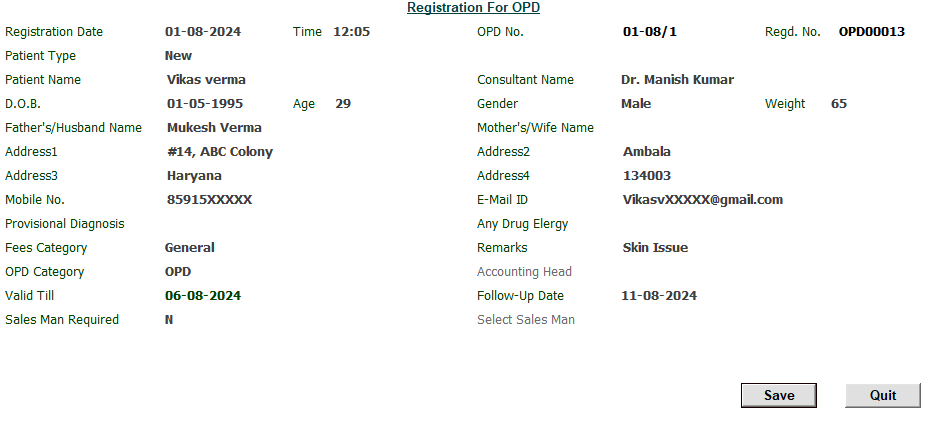
- Registration Date and Time auto-filled
- OPD No. and Regd. No. auto-generated
- Patient Type:
- New: Manual entry required
- Existing: Select from list; system auto-fills prior data
- Select Consultant Name (F3 to create a new doctor)
- Fill other details:
- D.O.B., Age, Gender, Weight
- Father’s/Husband’s Name, Mother’s/Wife’s Name
- Address (multiple lines), Mobile No., Email ID
- Diagnosis and any drug allergies
- Fees Category (General, ECHS, Other, TPA)
- Remarks
- Follow-Up Date and Valid Till (auto-calculated)
Click Save, and the system:
- Prints a registration slip for patient record/card
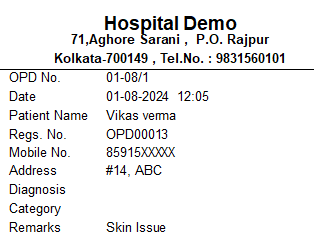
- Proceeds to Cash Counter for fee entry and payment
IPD Registration
Works the same way as OPD, with additional fields for inpatient admission tracking.
💰 Module 2: Cash Counter – Payment Entry and Settlement
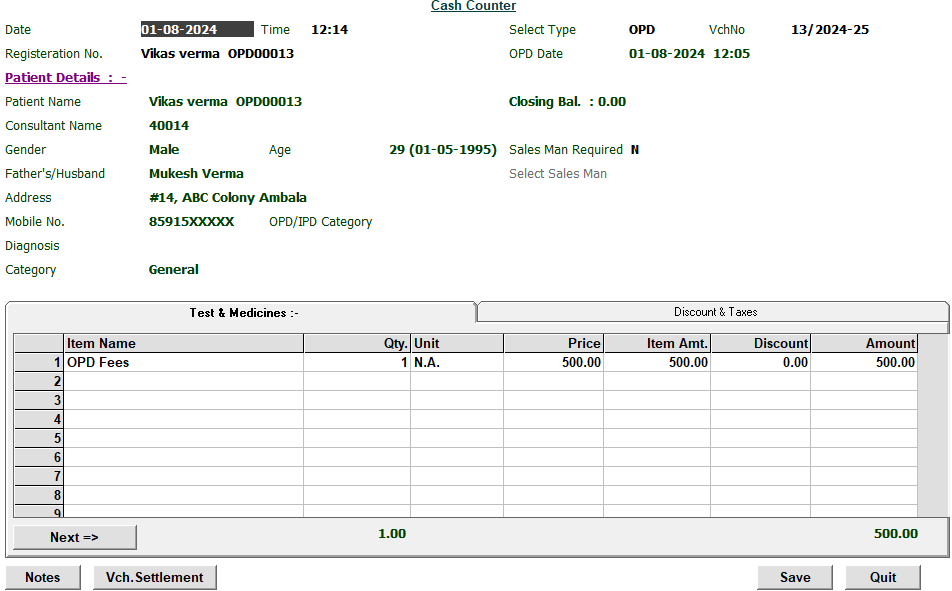
The Cash Counter opens automatically after registration. If skipped, it can be accessed manually.
Features:
- Enter patient name to fetch full details
- A fee grid appears to define consultation or registration charges
- Save voucher to finalize the entry
- The Settlement Window appears where you can:
- Accept cash or bank payments
- Settle partially or fully
- Generate receipts
This module ensures transparent and trackable billing, linked directly with patient registration.
💵 Module 3: Advance Payment for IPD Patient
Advance payments can be collected before services are delivered.
Add Advance Entry:
- Go to Advance in the main menu
- Add Receipt Voucher appears
- Enter patient details and advance amount
- Save the entry, which reflects in the patient’s account ledger
This feature is essential for pre-admissions, emergency cases, and package-based treatments.
📒 Module 4: Patient Account Ledger
The Account Ledger option offers a complete financial summary per patient.
View Includes:
- All registration and investigation fees
- Advance payments
- Bill payments and refunds
- Final balance (credit/debit)
It provides real-time financial tracking for each patient, ensuring accurate dues management and easy audit trails.
🔬 Module 5: Investigation Management
This module helps doctors and diagnostic staff manage tests and investigations.
Menu Options:
- Add
- Modify
- List
Add Investigation Process:
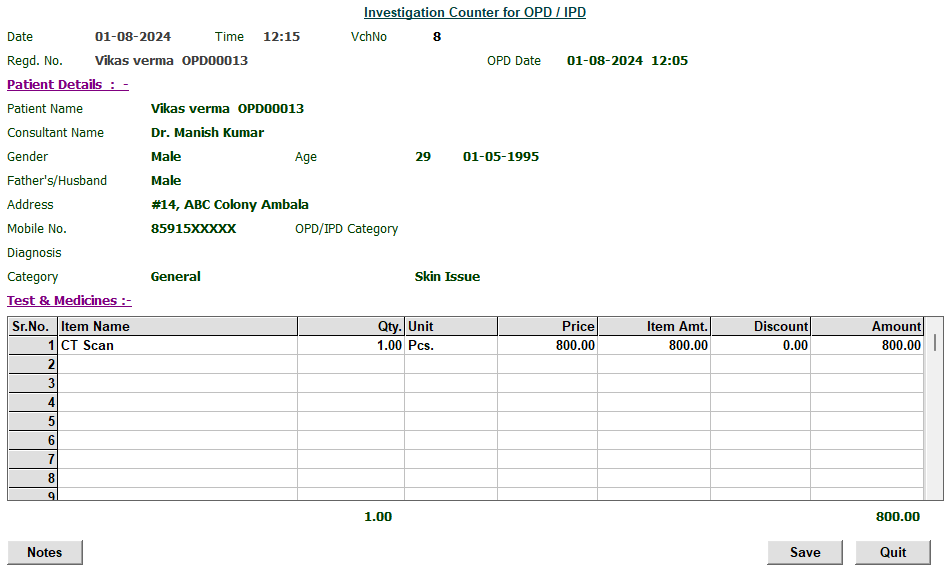
- Enter Registration No. to auto-load patient details
- Use the lower test/medicine grid to add:
- Pathology tests
- Radiology tests
- Prescribed medicines
Once complete:
- Save and print a detailed investigation bill
- The patient proceeds to Cash Counter for payment
💊 Module 6: Prescription Writing
This is the prescription management module for doctors.
Sub-options:
- Add
- Modify
- List
Add Prescription Flow:
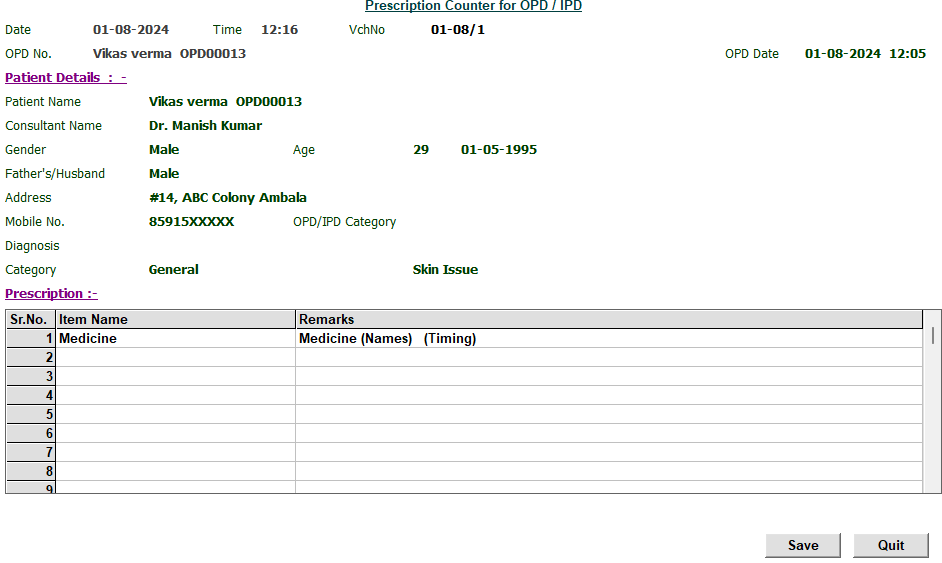
- Enter the OPD No. to fetch details
- Use the grid to add:
- Medicine Names
- Doses and timing (e.g., morning/evening)
- Related tests and dates
✅ Ensures centralized patient treatment history, useful for repeat visits and clinical audits.
📤 Module 7: Discharge Entry (Only for IPD)
When an inpatient is discharged, proper documentation is crucial.
Access via:
- Discharge Entry → Add
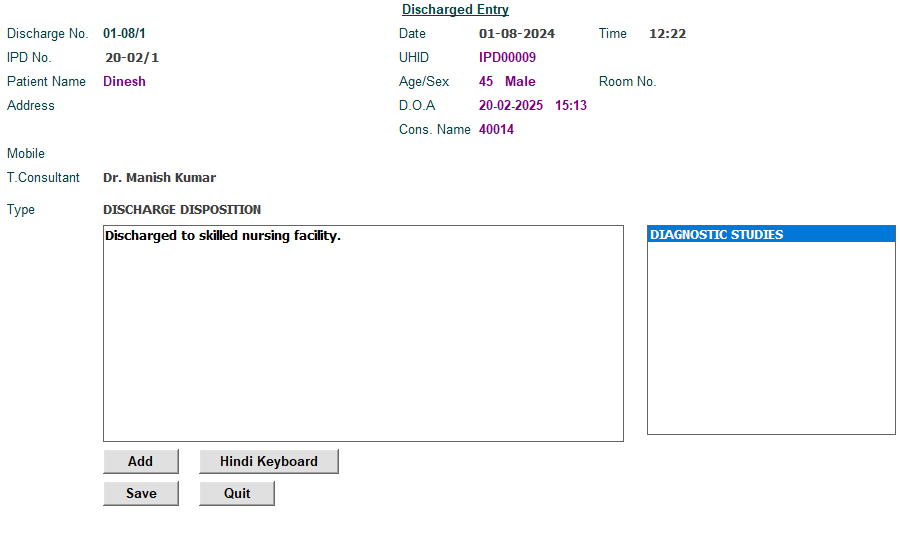
Process:
- Enter OPD No. to auto-fetch details
- Use the lower section to:
- Define discharge type (e.g., Cured, Referred, Deceased)
- Enter final diagnosis and discharge summary
- Print discharge slip and hand over to the patient/family
This ensures legal compliance, medical clarity, and future reference.
🏥 Use Case Scenarios
This Hospital Addon is suitable for:
- Multispecialty Hospitals
- Single-doctor Clinics
- Nursing Homes
- Diagnostic Labs
- Ayurveda and Homeopathy Clinics
- Dental Clinics
🚀 Key Features at a Glance
- 👨⚕️ OPD/IPD Registration with Follow-Up Tracking
- 💵 Automated Cash & Advance Management
- 📜 Customizable Patient Slips, Receipts & Discharge Forms
- 📑 User Rights & Role-Based Access
- 🧾 Investigation & Prescription Integration
- 📊 Real-Time Patient Ledger and Financial Reporting
- 📁 Centralized Clinical History Maintenance
📞 Get Started Today
Digitize and simplify your hospital operations with the Hospital Addon for Busy Software – built to reduce paperwork, speed up billing, and ensure professional medical recordkeeping.
💬 Need Help or a Demo? We’re Here.
📧 Email Us: contact@busyplugin.com
📞 Call Us: +91 70828 24212
🌐 Visit: www.busyplugin.com
Start transforming your hospital workflow today — with the trusted power of Busy and the custom capabilities of BusyPlugin.
🔘 Download Setup
Please click the button below to download the setup file for installation.
Disclaimer: Busy Accounting Software are trademarks of their respective owners. This Hospital Addon is a third-party customization developed to extend Busy’s core functionality for medical institutions.